

Release of Canvas Features
(Semester B 2025/26)
- last updated on 9 January 2026
The features have been released.
- Option of displaying Letter Grades in Student Grades
- Differentiation Tags in People
- Online Attendance report in Course Analytics
Option of displaying Letter Grades in Student Grades
| Course Area | Grades (Students) |
|---|---|
| Description |
If a teacher enables the Restrict view of quantitative data option in the course "Settings",
|
| Released on | 9 January 2026 |
| Role | Teacher, TA, Student |
| Guide |
How do I restrict the viewing of quantitative data in a course? (Canvas Instructor Guide) |
Differentiation Tags in People
| Course Area | People |
|---|---|
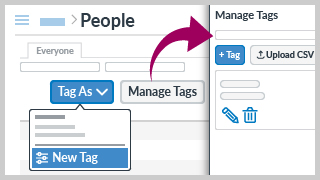
| Description | Teacher can use differentiation tags to assign specific content to customized sets of students, which are not visible to students. |
| Released on | 22 December 2025 |
| Role | Teacher, TA, Designer |
| Guide |
How do I create and manage Differentiation Tags as an instructor? (Canvas Instructor Guide) |
Online Attendance report in Course Analytics
| Course Area | Course Analytics |
|---|---|
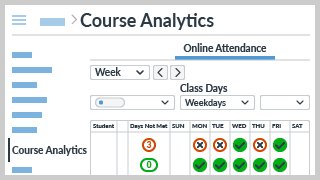
| Description | You can view the Online Attendance report in Course Analytics. If a student meets the requirements of any selected criteria (only "Course Access" enabled by default), they will be marked as present for that day in the Online Attendance report. |
| Released on | 22 December 2025 |
| Role | Teacher, TA |
| Guide |
How do I view the Online Attendance report in Course Analytics? (Canvas Instructor Guide) |