
News
/* The following article is extracted from the "Information Security Newsletter" published by the JUCC IS Task Force. */ Continuous advancements have been made to improve Remote Desktop security; however, universities still remain as a major target for exploiting Remote Desktop vulnerabilities:
/* The following article is extracted from the "Information Security Newsletter" published by the JUCC IS Task Force. */ Remote Desktop Protocol (RDP) is a proprietary protocol developed by Microsoft that enables users to interface with another computer through a graphical interface. RDP is based on, and is an extension of, the T-120 family of protocol standards, which is a multichannel capable protocol allowing for separate virtual channels for carrying presentation data, serial device communication, licensing information, highly encrypted data (keyboard, mouse activity), etc.
We are pleased to inform you that the over 10-year old Opscan 8/50 Optical Mark Reader is finally replaced by a new Sekonic SR-3500 machine. This machine supports all our existing standard forms and is bundled with a user-friendly application. In addition, another Sekonic SR-1800 machine has also been acquired as back-up to provide the scanning service in parallel. Both machines are installed in the CSC Printing & Plotting room.
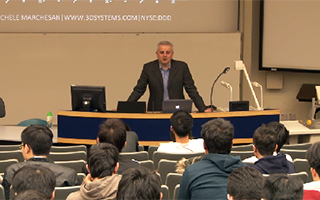
Since 2009, the OCIO has been organizing several experience/knowledge sharing sessions that are opened to all IT staff, both central and departmental, as well as any interested students. These sessions provide rare opportunities for IT staff across departments and units to meet and share their valuable experiences.
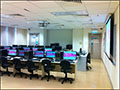
Introduction To equip our students with the fundamental IT skills for their study, research and work after graduation, the Computing Services Centre (CSC) sees the need to boost their IT knowhow through basic and advanced computer training as a complement to their formal curriculum.
We are glad to inform you that the newly released Microsoft Office 2010 is available now for staff's teaching and learning use. The launch of Office 2010 is as follows: Staff LAN Office 2010 is released for installation through the Staff LAN through the Work Desk menu. This will directly replace the Office 2007 products. When a staff member clicks on any of the Office 2010 product option from the Work Desk menu, the upgrade program will check for available storage space of the staff's machine, remove Office 2007 from the machine and then install Office 2010 there. The whole process takes about 20 minutes, depending on the hardware configurations.

The University is heavily relying on the Central IT systems to keep and manage student, staff and alumni information. A crisis or a disaster that destroys or severely cripples the Central IT systems for a prolonged period will have great impact on the normal business operation of the University. Therefore a well designed Business Continuity Plan for IT Systems (BCP) must be available with the following objectives :
The central IT systems for the “3+3+4” academic reform consists of 3 main parts – IT infrastructure, e-learning and Student Information System. IT Infrastructure In line with the development work for 2012/13, viz. new building, more classrooms, increase in number of students and faculty members, new application systems for the 4-year degree structure, etc., there is also expansion in the IT infrastructure and IT support. Preparation is in progress, including Wireless LAN – the coverage has been expanded and the service will be set up in new buildings. Recently the wireless LAN has been upgraded to support IEEE 802.11a/b/g/n.
The Exchange System is more than an email system. It is an enhanced, integrated and unified messaging system that provides Email, Calendar, Scheduling, Resource Booking, Contacts (Address Books), Tasks, Notes, etc. on an integrated and unified platform. Thus, data and services can easily be accessed anywhere through Microsoft Office Outlook, Outlook Web Access (OWA, the Webmail of Exchange) and Mobile devices.
Introduction The Committee on Information Services and Technology approved the Electronic University Data Regulations1 on 19 August 2010. Faculties and staff are obliged to protect “all data collected, maintained and used in the University's information systems.” In addition to observing related policies (for example, Policy on Use of IT Services and Facilities Organizations), departments must establish procedures to grant access privileges to different users, review the privileges periodically, restrict data transfer and duplications, and take measures to prevent data leakage as far as possible. This article will review the three stages of data (data at rest, data in use and data in motion) and examine how encryption technologies can be used to improve information security.
 CityU IT ChatBot