
FAQ
Academic Matters
Course Registration and Requirements
Check your designated time-tickets and perform web add/drop via
AIMS > Course Registration > Web Add/Drop
In the meantime, browse the master class schedule via Portal » Academic & Research » Academic Services » Master Class Schedule to find your desired courses. Remember to also take into account tutorial sessions so that you can build your perfect schedule!
Check out the important dates for your registration on the website of Academic Regulations and Records Office (ARRO), such as the release of student pre-registration schedule and the available date of web registration time-tickets.
Check what courses you should take via
AIMS > Study Plan > DegreeWorks
DegreeWorks helps you learn easily what courses you still need to take to fulfill the requirements of your College/School, Gateway Education (GE), major, minor, etc. It also provides features that help you plan your studies and communicate with your advisors. Plan ahead and get ahead with DegreeWorks!
You need to take at least 12 credits or a maximum of 18 credits per semester. However, you can apply through AIMS to adjust your study load with justifications if necessary.
AIMS > Course Registration > Application for Add/Drop of Non-Web-enabled Course & Study Load Adjustment
You may refer to "Study Load" on ARRO's website for more details.
Yes. You can decide to drop your minor during the specified periods of adding/dropping minors. Please observe the effective term in order to plan for your studies and graduation.
Click here to find out the key dates and points to note when adding /dropping minors.
You have to fulfil a total of 31 credits which can be divided into three parts.
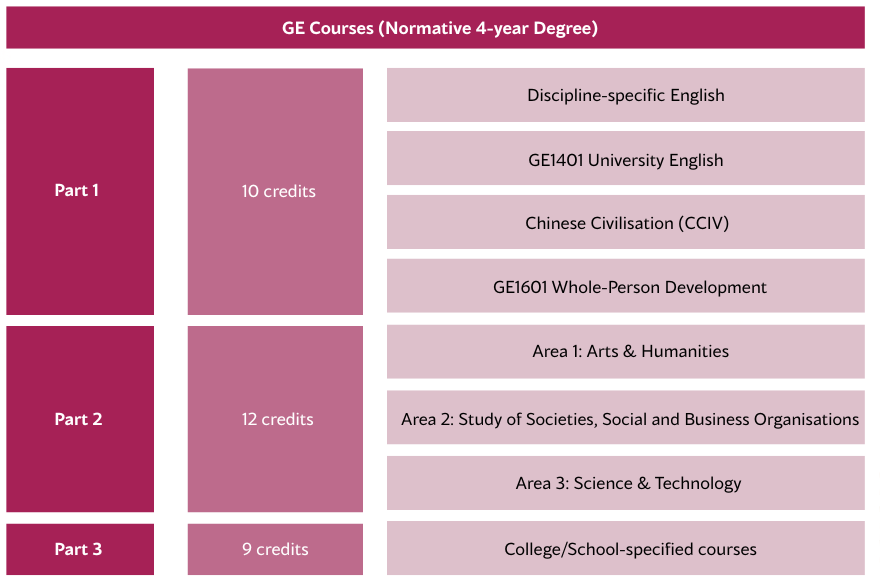
Important reminder:
For registering Part 2 GE courses from Area 1-3, you can only register one course in the second
time-ticket period during web registration. If you have to register two or more GE courses,
the remaining ones have to be registered in the third time-ticket period during course registration.
Find out the requirements of your College or School here.
The first week is a grace period for all course add/drop. You can still apply for the courses you want and drop the ones that don't fit but remember to always read the course syllabus/outline for more information about the course. Pay attention to the submission dates and course weighting to find the most suitable course for you!
To get your course materials:
- Log in Canvas
- Select ‘Dashboard’ / ‘Courses’ on the navigation bar to view all registered courses
- Click on the respective course title
- Find your course materials by clicking on ‘Files’ / ‘Modules’ on the left column
Pay attention to the instructions given by the lecturer in class as they have their own practices in uploading course materials.
View your academic weekly schedule via
AIMS > Course Registration > Weekly Schedule
The timetable provides you with the information including the time, day, course code and venue of all your courses at a glance!
Academic Transcript and Testimonial
Submit your online application for Academic Transcript or Testimonial via AIMS. Please visit the website of Academic Regulations and Records Office (ARRO) or ARRO’s Service Centre at 5/F Fong Yun Wah Building for more information.
Global Learning Opportunities
Looking for a life-changing experience? Learn more about our Student Exchange Programme. Follow the Instagram of Global Engagement Office @cityuhkgeo to get the latest update and news!
CityUHK encourages all students to gain global experience. In addition to semester-long student exchange opportunities, students can participate in summer programmes, study tours, and non-local internships organised by various units. Be sure to pay attention to announcements online and around the campus! Learn more on GEO website.