
Works behind Client Virtualization in the CSC Teaching Studios
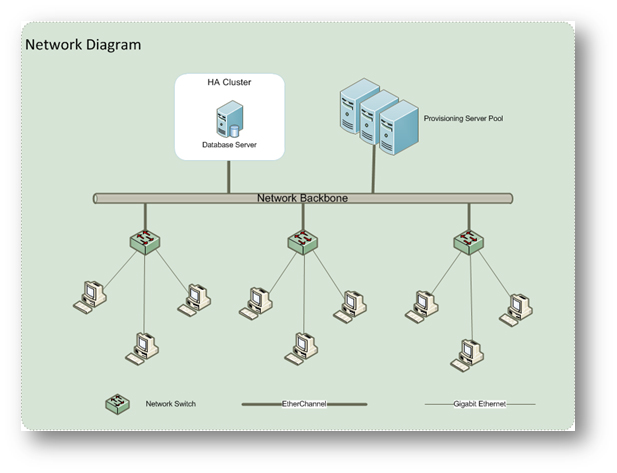
A New Look
User experience was also our concern and we hoped that users would be familiarized with the new interface quickly and use it without difficulty.
When a virtualized PC is booted up, the following selection menu will be shown:
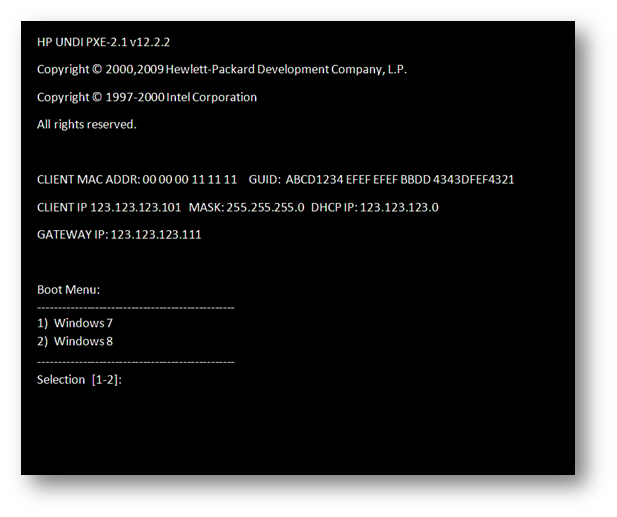
The new user interface is very similar to the traditional one with MS Windows 7 and MS Windows 8 for user selection. Users can simply select the required operating system to work with. After making the choice, the rest of the boot up process is automatic and soon the selected MS Windows version will be shown.
What is next?
Future implementation of virtual desktop in CSC Teaching Studios and other venues on campus will depend on the results of the pilot phase. Staff and students are encouraged to explore the technology in AC2-4200 and the two Open Access Areas (AC2-G601 and AC2-5802) and to email their comments to the CSC at csc@cityu.edu.hk with the subject “Virtual desktop in CSC”.
References
- Preboot Execution Environment (PXE)
http://en.wikipedia.org/wiki/Preboot_Execution_Environment - High-availability cluster (HA)
http://en.wikipedia.org/wiki/High-availability_cluster - Solid-state drive (SSD)
http://en.wikipedia.org/wiki/Solid-state_drive - Optical fibers
http://en.wikipedia.org/wiki/Optical_fiber - Fiber-optic communication
http://en.wikipedia.org/wiki/Fiber-optic_communication - EtherChannel
http://en.wikipedia.org/wiki/EtherChannel - Gigabit Ethernet
http://en.wikipedia.org/wiki/Gigabit_Ethernet - Load balancing (computing)
http://en.wikipedia.org/wiki/Load_balancing_(computing) - Citrix Provisioning Services Streaming Technology
http://support.citrix.com/proddocs/topic/technologies/pvs-provisioning.html
 CityU IT ChatBot