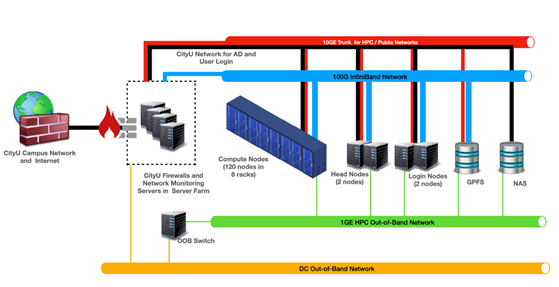
The University provides centralised high performance computing (HPC) resources to support its academic and research communities. All teaching staff, research staff, research degree students are eligible to apply for an account. Below are the essential components of CityUHK Burgundy:
Login Nodes
Hostname is burgundy.hpc.cityu.edu.hk
RedHat Enterprise (version 8) Linux systems without a graphical interface
The common landing point for users to access Burgundy with SSH sessions.
Running production workload on the login node is strictly prohibited. Following operations, however, will generally be considered reasonable usages on the login node:
Manipulating input or output files,
Submitting jobs to the workload manager,
Downloading and installing applications,
Compiling programs, or
Other operations approved by the system administrator in advance.
Computing Nodes
176 Compute Nodes; each node has
2 X AMD EPYC 7742 64-core processors (128 cores/node)
512 GB Memory (Useable memory space ~ 448GB)
CentOS 8.1
400GB Local storage at /local
Twelve (12) A100/80 GPU Nodes; each node has
4 X NVlink based Nvidia A100s Accelerator,
1 X AMD EPYC 7532 32-Core Processor,
and
1TB Memory (960GB useable memory space)
Five (5) Large V100s GPU Nodes; each node has
8 X PCIe based NVidia V100s Accelerator,
2 X Intel Xeon Gold 5220R 24-core processors, and
1.5TB Memory (690GB useable memory space)
Two (2) Small V100s GPU Nodes; each node has
6 X PCIe based NVidia V100s Accelerator
2 X Intel Xeon Gold 5220R 24-core processors, and
1.5TB Memory (690GB useable memory space)
Three (3) High-memory Nodes; each node has
4 X Intel Xeon(R) Gold 6238L 22-core processors, and
4TB Memory
File Systems
One (1) 2.25P Lenovo/IBM Spectrum Scale Parallel File System
Two directory groups are hosted under this file system.
User Home Directories ($HOME):
A parament storage space for user to keep essential login files, and
150MB disk quota per user
Scratch Directories ($HOME/scratch):
A high-performance temporary storage space for workloads,
500MB disk quota per user by default, and
Regular housekeeping to remove unused files
Note: Disk quota restriction was effective since Q2 2021. Users who need additional storage space on the scratch directories are required to submit a request with justifications to the system administrator.
Other Supporting Systems and Network Infrastructures
Head and Monitoring Nodes
License Server
Mellanox 100GB InfiniBand Network
HPC Management 10G Ethernet Network
Out-of-band 1G Ethernet Network
Last modified: Version 2 - August 2024
Support & Contact
Interested parties may contact the IT Service Desk or drop an email at csc.hpc@cityu.edu.hk to indicate their needs and provide the list of desired applications. The Computing Services Centre (CSC) will help evaluate if the applications can be run on the HPC environment.

 CityU IT ChatBot