The
term Wi-Fi is now commonly used to describe the underlying
technology of wireless local area network (WLAN) based on
the IEEE 802.11 specifications. Wi-Fi hotspots
are venues (often public locations) that offer broadband Internet
access using the WLAN technology. In Hong Kong, most hotspots
for wireless Internet access are operated on a commercial
basis, though some hotspots in the Passenger Terminal Building
of the Hong Kong International Airport are providing service
free of charge.
CityU,
as well as the other local universities in Hong Kong, has been
invited by at least one Wi-Fi broadband service providers to take
part in a collaborative effort with the aim to transform Hong Kong
into a Wi-Fi city. The universities are chosen mainly because most
of them have a large user population and a well established WLAN
infrastructure in place. In essence, the collaborative effort will
provide mutual benefits for the 2 parties (the university and the
service provider) involved, whereby:
University members (staff members and students of the
university) will be given free Internet access at all the
hotspots operated by the service provider.
The
university will open up part of its WLAN for Internet access to
the subscribers of the service provider. The service provider
will provide the Internet bandwidth and IP addresses to its
subscribers through a peering telecommunication link set up by
the service provider.
Most
service providers adopt a technique called captive portal for user
authentication. Whenever a subscriber starts up a web browser on
his wireless device, the first web page the user is trying to
access will be redirected to a special web page (usually a login
screen) at which he/she will be asked for a username and password
pair. Upon successful authentication, the user will be able to
continue the Internet access. Although SSL (Secure Socket Layer)
encryption is used for the captive portal to protect the username
and password from being sniffed (captured) in the air, all the
data traffic thereafter is carried over the wireless connection
unencrypted. As such, the wireless connection is extremely
insecure. However, there are a few advantages in using captive
portal:
Most
wireless devices, especially mobile devices such as PDA or smart
phones, come with a web browser, therefore there is no need to
install additional software for user authentication. No user
configuration is required on the system software and the web
browser. Therefore, almost all wireless devices can be
supported, as long as a web browser can be run on these devices.
First time subscribers may create a new user account and provide
payment details through the captive portal. This is very
convenient for those people on-the-go who need immediate and
temporary Internet access at the hotspots.
Service providers also prefer this kind of access control as
they can take advantage of the login web page for customer
communications.
CityU
considers using captive portal for user authentication at the
hotspots insecure and therefore unacceptable for the university
members. When a university member reads his email messages at a
hotspot using an email client software which is configured with
either POP3 or IMAP protocols for accessing his mailbox, his email
account and password will be passed to the email server for user
authentication in clear-text format. The latter can easily be
captured by some malicious person using a packet sniffer such as
AirSnort, Kismet, and NetStumbler, etc.
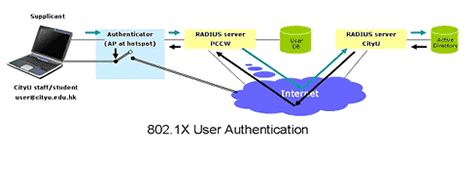
In
this respect, CityU and some other local universities will
use 802.1X
(IEEE 802.1X is an IEEE standard for port-based network access
control) instead of captive portal for user authentication,
because 802.1X is increasingly the authentication protocol
of choice on WLANs. 802.1X is a framework protocol which supports
various
EAP (Extensible Authentication Protocol) methods, subprotocols
that perform authentication transactions. For a university
member of CityU, there is no need to install a digital certificate
on his wireless device, but he will be authenticated using
his existing Windows account and password. The data transmission
over the wireless connection will be encrypted using WPA
(Wi-Fi Protected Access), which uses a different encryption
key for each data frame and includes a mechanism to prevent
man-in-the-middle attacks. Windows XP, Windows Vista, and
the latest service pack of Windows 2000 support 802.1X for
all network connections by default.
CityU
will join Eduroam (www.eduroam.org)
as a member in the near future so that university members
will be able to enjoy free Internet access when visiting other
member institutions in Europe, the Asia Pacific region as
well as those that have joined the Eduroam in other parts
of the world.
References:
-
Educational Roaming Infrastructure (Eduroam)
http://www.eduroam.org/
-
Eduroam Turns Academics into Guests
http://www.wi-fiplanet.com/columns/article.php/3504406
-
802.1X from Wikipedia
http://en.wikipedia.org/wiki/802.1x
-
What
is 802.1X from Network World Fusion
http://www.networkworld.com/research/2002/0506whatisit.html
-
Hotspot (Wi-Fi) from Wikipedia
http://en.wikipedia.org/wiki/Hotspot_(Wi-Fi)